
Cost Paid
Save what you paid when the product enters inventory so later profit is not a guess.
Track your cards. Sell them when you’re ready.
Collector is free with unlimited collection inventory, no credit card. Vendor is $39.99 USD / month. Store is $59.99 USD / month. Paid plans include a 14-day Stripe trial.
Know what you own. Know what it cost. Know where it sold. Know what actually made you money.
Save what you paid when the product enters inventory so later profit is not a guess.
Sales, cost, and expenses stay attached to the same inventory records.
Track submission cost, grades, and sold prices when you send cards out.
Convention profit and distributor spend live next to the inventory you actually moved.
CardSync Pro uses flat monthly pricing on Vendor and Store. CardSync does not take a percentage of your sales. Marketplace and payment-processing fees still apply.
Some TCG platforms combine software costs with percentage-of-sales fees. CardSync does not.
Product proof
These are real CardSync Pro screens, not concept renderings. Each caption explains what you are looking at and why a card seller uses it.
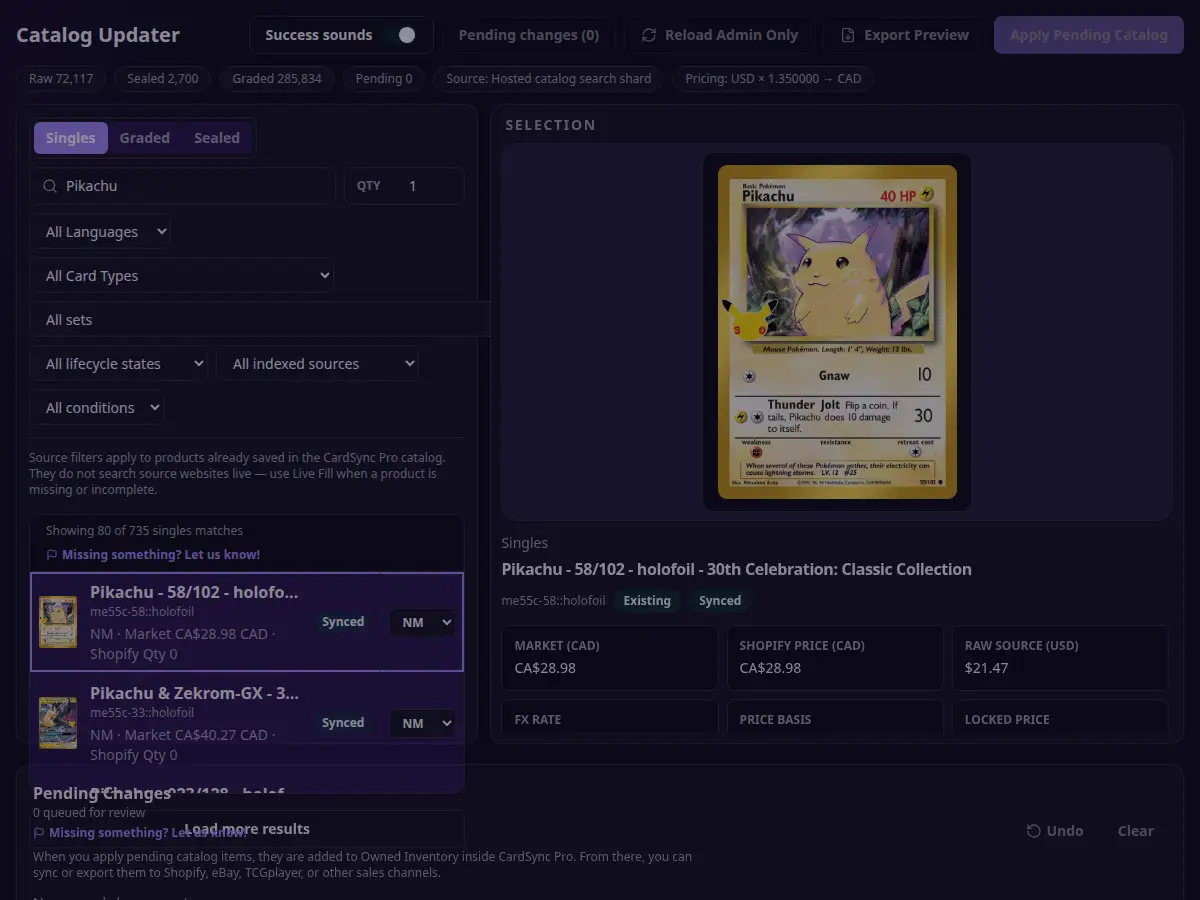
01 · Add cards and sealed products
Search the catalog, choose the printing and condition, then save quantity, Cost Paid, and asking price before the product reaches your inventory.
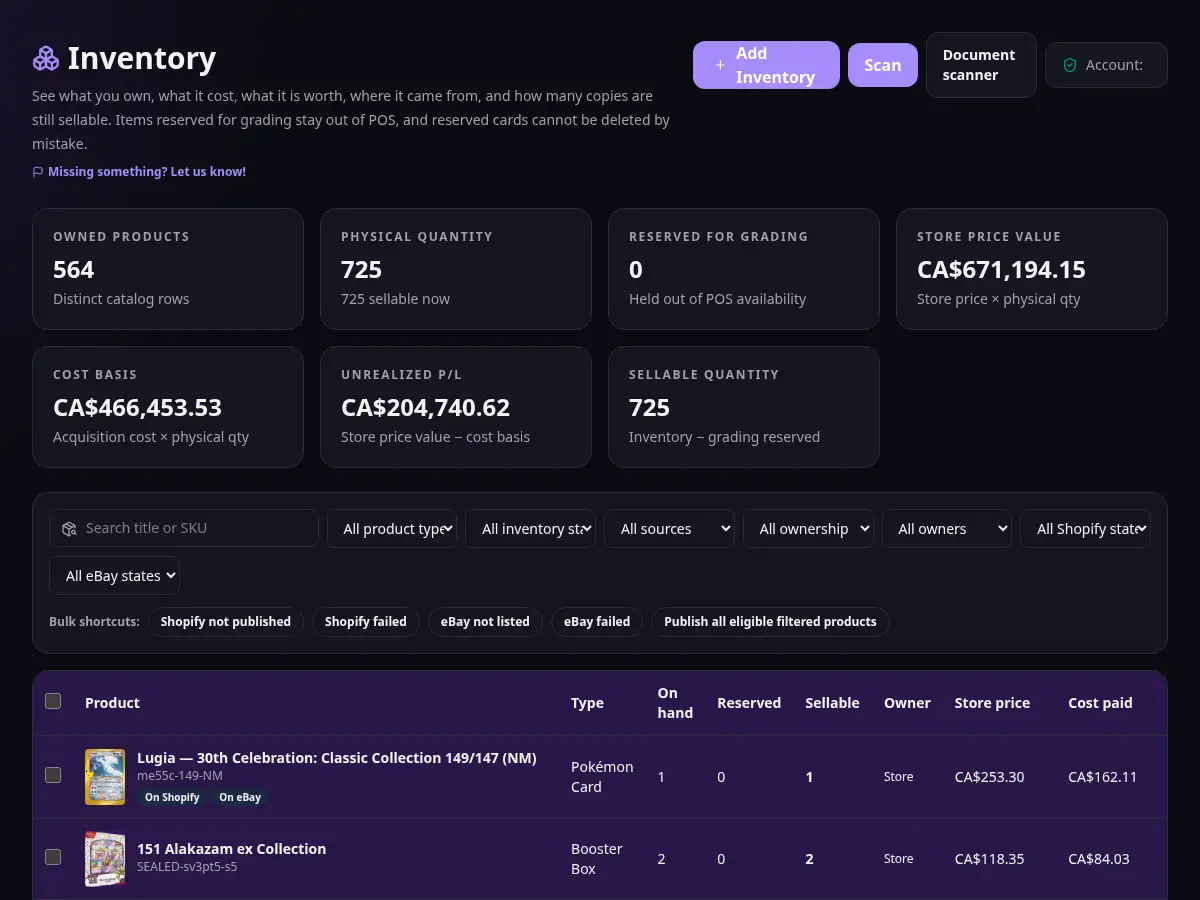
02 · See what you actually own
Owned inventory keeps raw, sealed, and graded products together, with quantity, market value, and channel status on the same record.
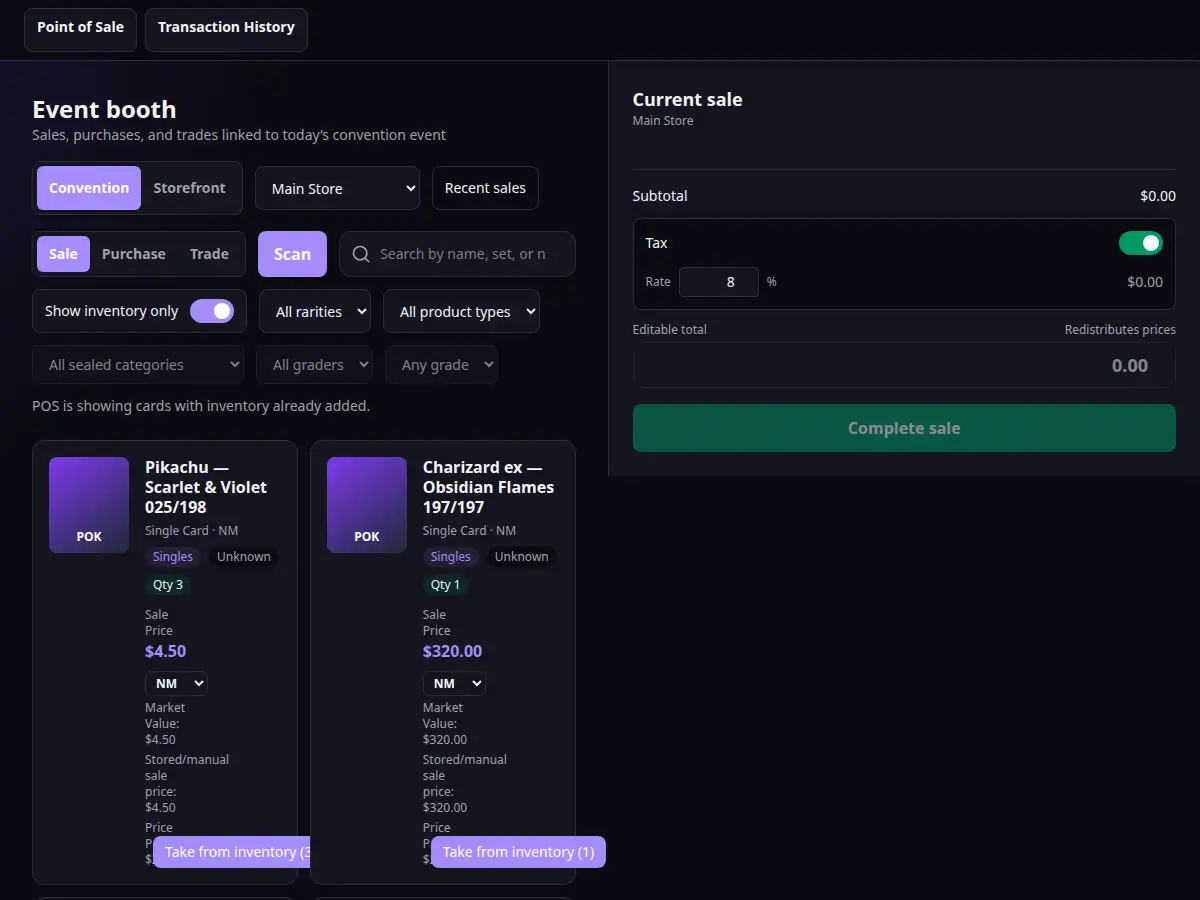
03 · Sell at the counter or a convention
Convention POS searches your inventory, builds a current sale, and keeps the weekend’s numbers attached to the same products you packed.
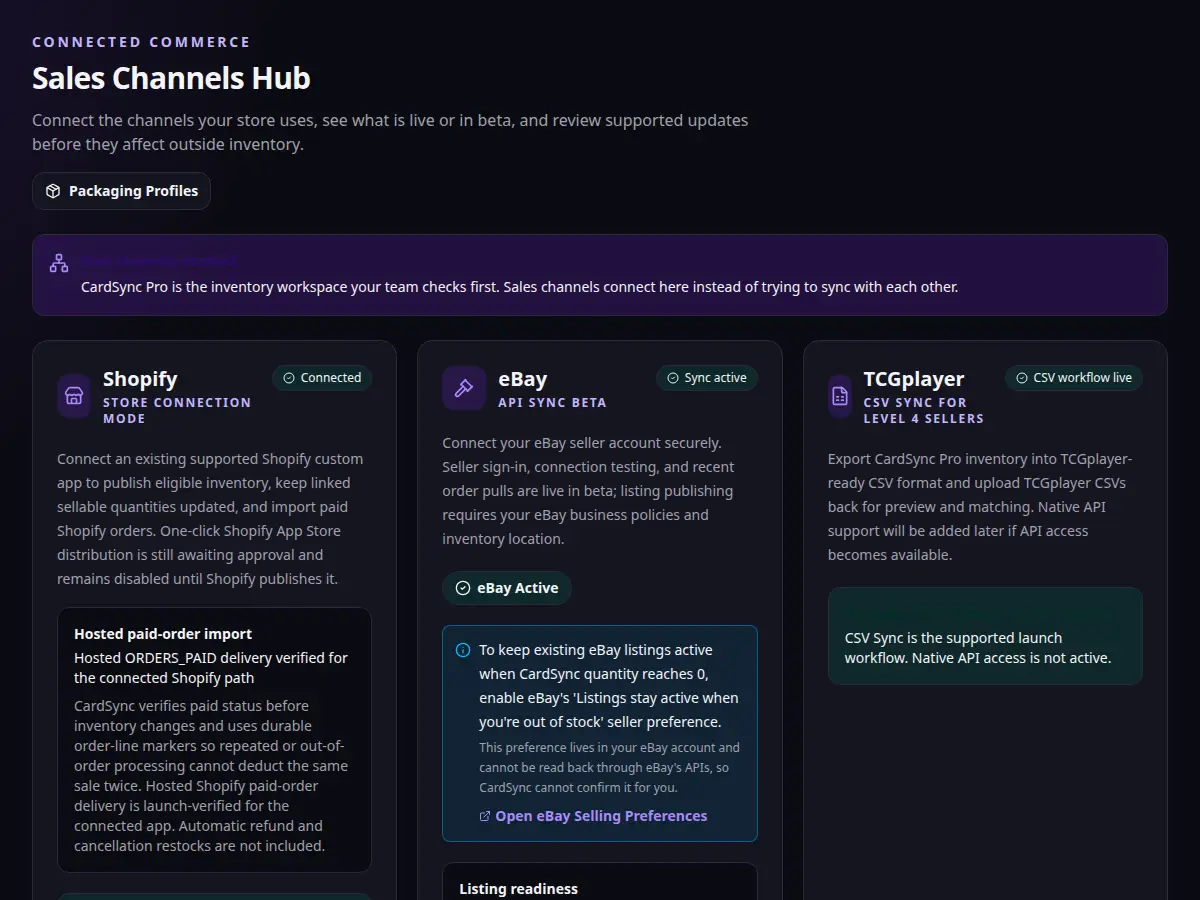
04 · Connect the channels you sell on
The Sales Channels Hub shows a connected Shopify store, eBay in beta with sync active, and the TCGplayer CSV workflow for eligible Level 4 sellers.
Why this is usable today
CardSync Pro is built for collectors becoming vendors and for stores that already sell cards. The proof is the working product, honest channel status, and pricing you can start without a sales call.
Open the product with a verified email. Channel connects stay simulated in the demo so nothing is published to a live store.
Shopify is Live. eBay is Beta. TCGplayer CSV is Live. Wix is Planned.
Collector is $0 with unlimited collection inventory, and no credit card required.
Vendor is $39.99 USD / month. Store is $59.99 USD / month. Checkout is handled by Stripe.
New channel listings and sensitive price changes stay reviewable. Automation should not dump an unreviewed catalog onto Shopify or eBay.
Questions go to support@cardsyncpro.com. Privacy and cancellation terms are published, not hidden in a sales call.
Why CardSync Pro exists
CardSync Pro is software for trading-card collectors, vendors, and card stores. It exists so catalog work, Cost Paid, sales, conventions, grading, and profit stay in one workspace instead of a pile of spreadsheets and marketplace admin screens.
Available now
The goal is not to give you another dashboard to babysit. It is to keep the catalog, inventory, pricing, selling, grading, events, and numbers connected so the same information does not need to be entered over and over.
Search the catalog, choose the right printing and condition, then save quantity, Cost Paid, store price, owner, and SKU in one pass.
Use rules, floors, rounding, and locked prices, then review the changes that deserve a second look before they reach a channel.
Plan event inventory, sell through Convention POS, record trades and expenses, and see the result after the weekend is over.
Sales, Cost Paid, grading fees, convention expenses, inventory value, and profit stay connected instead of living in separate files.
Available now
Before a convention, download your store inventory and product images to the device. If venue Wi-Fi drops, you can still search that inventory and save prepared Convention sales in a desktop browser. Purchases, trades, and card-terminal payments still need a connection. Selling from a phone if the site goes down is not verified yet.
Prepare before the show
Readiness checks make it clear whether the device is actually prepared.
Keep inventory close
Downloaded inventory and cached product images stay tied to the selected store.
Fail safely
Online-only actions stay guarded when the connection is uncertain.
One connected workflow
A card should not become a brand-new data-entry project every time it moves from a binder to Shopify, a convention case, grading, or a sale. CardSync Pro keeps those steps tied to the same inventory record.
That gives you a cleaner history, fewer quantity mistakes, and numbers you can trace back to what actually happened.
Sales channels
Some connections are live, some are beta, and some still depend on marketplace approval or access. The status below is the status customers should see before they try to connect.
Shopify works now for connected stores: publish products, keep linked quantities updated, and import paid orders. One-click App Store install is still waiting on Shopify approval. Refunds and cancellations are not restocked automatically yet.
eBay is currently in beta. You can connect a seller account and use reviewed publishing for linked listings. Some automatic order updates are still being verified.
TCGplayer CSV export and import is live for eligible Level 4 sellers. Direct API sync is not generally available yet.
Wix publishing is planned. You can organize inventory in CardSync today, but CardSync does not publish to Wix yet.
Feature status
This is the practical version of the roadmap. It separates the tools you can use today from features that are in beta, awaiting approval, access-gated, or still planned.
| Feature | Status | What that means |
|---|---|---|
| Inventory | ||
| Catalog Updater | Live | Search singles, sealed, and graded products, price by condition, and review Pending Changes before they apply. |
| Owned Inventory | Live | Search raw, sealed, and graded inventory with quantities, market values, cost where entitled, and channel status. |
| Inventory Sync | Live | Publish reviewed batches and keep already-linked Shopify and eBay quantities aligned from CardSync. |
| Inventory Audit | Live | Count a session, import or export counts, review discrepancies, and apply verified corrections. |
| Consignment | Beta | Track consignor-owned inventory, commission terms, and payouts separately from store-owned stock. |
| Pricing Rules | Live | Set margins, floors, rounding, and locked prices, then review channel price changes before they publish. |
| Selling & POS | ||
| Convention Manager | Live | Plan event inventory, expenses, and preparation, then review that event’s performance after the show. |
| Convention POS | Live | Search inventory, build a sale, take trades, and recover an interrupted checkout before you retry it. |
| Offline Mode | Live | Prepare inventory before an event and keep searching it and recording supported Convention sales if venue internet drops. |
| Online Sales | ||
| Sales Channels Hub | Live | See Shopify, eBay, and TCGplayer connection and sync status from one workspace. |
| Shopify | Live | Connect a store, publish products, sync linked quantities, and import paid orders. One-click App Store install is still awaiting Shopify approval. |
| eBay | Beta | eBay is currently in beta. You can connect a seller account and use reviewed publishing for linked listings. Some automatic order updates are still being verified. |
| TCGplayer CSV | Live | Export and import TCGplayer CSV files for eligible Level 4 sellers. |
| TCGplayer API | Access-gated | Native TCGplayer API sync stays off unless TCGplayer authorizes access for the seller. |
| Packaging Profiles | Live | Save reusable packaging and shipping configurations for the products you ship. |
| Packaging Helper | Live | Use product and packaging information to prepare more consistent shipment packaging. |
| Wix | Planned | Wix publishing is planned. You can organize inventory in CardSync today, but CardSync does not publish to Wix yet. |
| AI & Scanning | ||
| AI Card Scanning | Beta | Recognize cards from a camera or batch, then review them before they join inventory. Collection inventory is free; AI scanning is metered separately. |
| Document Scanner Support | Beta | Intake high-volume batches from supported document scanners on Store, then review cards before confirming them. |
| ProductForge AI | Beta | Draft products the catalog does not cover, including image-assisted recognition, and confirm the result before it is saved. |
| Insights & Operations | ||
| Profit Center | Live | Review sales, Cost Paid, profit, and product, channel, grading, and event performance on Vendor and Store. |
| Grading Manager | Live | Submit cards, reserve inventory, record fees and grades, and see market value, sale value, and ROI. |
| Distributor Intelligence | Live | Track distributor allocations, spend, shipments, sales, and ROI for a Store workspace. |
| Barcode and label workflows | Planned | Picking, label printing, and barcode packing workflows are not available yet. |
Why it feels different
Card inventory at an LGS or convention table changes condition, location, owner, purpose, and value. The software should expect that instead of treating every product like a generic warehouse widget.
Features are marked live, beta, awaiting approval, access-gated, or planned. You should not have to discover the real status after clicking the button.
Conditions, variants, Cost Paid, owners, grading reservations, convention inventory, and channel mappings are normal parts of the workflow, not awkward add-ons.
New publishing and sensitive price changes stay reviewable. Automation should remove repetitive work without creating a bigger cleanup job.
CardSync Pro is not just a catalog and it is not just a POS. It keeps inventory, pricing, events, grading, channels, and profit connected so one job does not create three more.
Catalog and Owned Inventory
Search singles, sealed products, and graded cards, then add them to inventory with the details that actually matter to your business.
Pricing Rules and Pending Changes
Set your margins, rounding, floors, and channel rules without giving up control of what gets published.
Convention Manager and POS
Plan the show, choose what you are bringing, sell through a prepared desktop browser, record trades, and see whether the weekend was worth it.
Offline Mode
Before a convention, download your store inventory and product images to the device. If venue Wi-Fi drops, you can still search that inventory and save prepared Convention sales in a desktop browser. Purchases, trades, and card-terminal payments still need a connection. Selling from a phone if the site goes down is not verified yet.
Sales Channels
Shopify works now for connected stores: publish products, keep linked quantities updated, and import paid orders. One-click App Store install is still waiting on Shopify approval. Refunds and cancellations are not restocked automatically yet.
Grading Manager
Keep every submission, fee, grade, value, and eventual sale tied back to the card you actually sent away.
Profit Center
See what you sold, what it cost, what you spent, and what you actually made without rebuilding the business in a spreadsheet.
ProductForge AI
Create a clean, reviewed draft for a product that is not in the catalog. Image-assisted recognition is a beta input and may require manual correction.
Start by tracking a collection, move to Vendor when you start selling, and to Store when those sales move online.
Track your collection for free with unlimited inventory. Available market values contribute to the total, and unpriced items are disclosed. No credit card.
Turn that collection into inventory with quantities, cost paid, and asking prices. Sell, buy, and trade through POS at the counter or at an event, and see your revenue, cost, and profit.
Shopify connected publishing, linked quantity updates, and hosted paid-order import are available for supported connected stores. One-click Shopify App Store distribution is still awaiting approval. eBay seller connection is available in beta. TCGplayer CSV export/import is live for eligible Level 4 sellers.
Collector is not a timer counting down in the background. Move up when you start selling, and again when you start selling online.
Simple pricing
Collector tracks what you own and what it is worth. Vendor turns it into inventory you sell in person. Store connects your online shops to the same inventory.
For tracking a collection: what you own, available market values, and disclosed pricing gaps.
$0
No credit card required. Collector is not a time-limited demo.
For turning that collection into inventory you sell, at the counter and at events.
$39.99/month USD
14-day trial through Stripe. Adds POS for selling, buying, and trading.
Secure billing through Stripe · 14-day trial · Cancel through the Stripe Customer Portal Cancellation Policy.
For selling the same inventory online as well as in person.
$59.99/month USD
14-day trial through Stripe. Everything in Vendor, plus your online stores.
Secure billing through Stripe · 14-day trial · Cancel through the Stripe Customer Portal Cancellation Policy.
Paid plans begin with a 14-day trial through Stripe. Prices exclude applicable taxes, payment-processing fees, and optional add-ons. Features with limited or future availability are labeled throughout the site.
Questions before you choose
Yes. Collector lets you search our catalog, add cards and sealed products, and total the available market values with unlimited collection inventory. Items without a current value are disclosed and excluded from the total. It is a real account, not a trial.
Collection management is free and unlimited. AI scanning is metered separately and is available through the applicable scanning offering.
Vendor makes sense once you are actually selling. It adds inventory with cost and asking prices, POS for sales, purchases and trades, event selling, and your revenue and profit numbers. A large collection does not require the upgrade.
Store adds online-channel workflows. Shopify works now for connected stores: publish products, keep linked quantities updated, and import paid orders. One-click App Store install is still waiting on Shopify approval. Refunds and cancellations are not restocked automatically yet. eBay is currently in beta. You can connect a seller account and use reviewed publishing for linked listings. Some automatic order updates are still being verified. TCGplayer CSV export and import is live for eligible Level 4 sellers. Direct API sync is not generally available yet.
Shopify works now for connected stores: publish products, keep linked quantities updated, and import paid orders. One-click App Store install is still waiting on Shopify approval. Refunds and cancellations are not restocked automatically yet.
No. Shopify works now for connected stores: publish products, keep linked quantities updated, and import paid orders. One-click App Store install is still waiting on Shopify approval. Refunds and cancellations are not restocked automatically yet. eBay is currently in beta. You can connect a seller account and use reviewed publishing for linked listings. Some automatic order updates are still being verified. TCGplayer CSV export and import is live for eligible Level 4 sellers. Direct API sync is not generally available yet. Wix publishing is planned. You can organize inventory in CardSync today, but CardSync does not publish to Wix yet. Automatic daily channel price synchronization is not running.
FAQ
Yes. Collector is a real email-verified account, not a timed demo. Track your collection for free with unlimited inventory, including catalog search and available market values.
No credit card is required for Collector. Vendor and Store paid plans start with a 14-day trial through Stripe, and checkout is where billing details are collected.
Track your collection for free with unlimited inventory. Upgrade to Vendor when you're ready to start selling. Upgrade to Store when you need supported online channels and a larger business workflow. Collection size does not force an upgrade. AI scanning is metered separately.
Yes on Vendor and Store. Convention tools cover event inventory, Convention POS in a prepared desktop browser, trades, expenses, and results after the show.
Before a convention, download your store inventory and product images to the device. If venue Wi-Fi drops, you can still search that inventory and save prepared Convention sales in a desktop browser. Purchases, trades, and card-terminal payments still need a connection. Selling from a phone if the site goes down is not verified yet.
Shopify works now for connected stores: publish products, keep linked quantities updated, and import paid orders. One-click App Store install is still waiting on Shopify approval. Refunds and cancellations are not restocked automatically yet.
eBay is currently in beta. You can connect a seller account and use reviewed publishing for linked listings. Some automatic order updates are still being verified.
TCGplayer CSV export and import is live for eligible Level 4 sellers. Direct API sync is not generally available yet.
Yes. The usual path is to search the catalog, add the products you already track, and keep quantity, Cost Paid, and asking price in CardSync instead of rebuilding them in a new sheet. There is no bulk spreadsheet importer advertised as a one-click migration.
CardSync does not currently provide a BinderPOS importer. Stores typically add inventory from the CardSync catalog and use the TCGplayer CSV workflow where that marketplace applies. The BinderPOS alternative page explains the comparison without promising a one-click move.
No. CardSync charges a monthly subscription for Vendor and Store. It does not take a percentage of your sales. Optional add-ons, payment-processing fees, and taxes are separate from CardSync’s subscription.
Yes. Paid subscriptions are managed in the Stripe Customer Portal using the billing email from checkout. Cancellation follows the subscription terms Stripe shows you.
Paid dashboard access may remain available until the current billing period or trial ends. CardSync keeps account, inventory, and billing records as needed to run the service, keep a reliable history, and meet legal requirements. Disconnecting a sales channel stops future access through that connection. You can contact support to request deletion of eligible account or marketplace data.